Network Change Control with Git and Nornir

• 21 min read
When I finally landed my first Networking gig, the company had a very tedious change control process. Changes had to be written up in a Word document, submitted by a deadline, and then you would have to attend a lengthy review call with various stakeholders to defend the work before you could finally schedule it. Hopefully you're not in a similar position, but if you are then this article could be helpful for you!
We'll go over how you can move your config changes into Git, where each engineer creates a branch for their proposed change and gets a peer review from the people who need to sign it off. No lengthy calls, all tracked with version control! Once reviewed and merged, a self-hosted runner deploys the change to the network via Nornir - simple really.
This might not seem like much, but for some it could be a great first step towards getting the company on board with Network Automation. The reviewer sees a diff generated by the device itself, posted straight into the pull request - not a Word document describing what you think will happen.
I'll be using Containerlab as the network so you can easily follow along. As long as Nornir has the correct data you can replace this with physical kit - the runner just needs to be able to reach it.
What we're building
The end result looks like this:
- An engineer creates a branch and drops a config snippet into their device's folder under
change-requests/<hostname>/ - They open a pull request
- The runner dry runs the change and posts the device's own diff as a comment, while CODEOWNERS pulls in the right reviewers automatically
- Someone approves, the PR gets merged
- A second workflow deploys the change - with a manual approval gate if you want one
As always you can clone the full setup from my GitHub repo, and if you haven't used Nornir before then my previous post covers the basics of the scripts we'll be reusing here.
Configuring a self-hosted runner
Because we will be connecting to network devices on our network we will be using a self-hosted runner - this means the GitHub workflows run on our own infrastructure rather than GitHub's. The runner will therefore need network access to the routers it's connecting to.
the diff we're going to show reviewers comes from the device, which means the runner has to be able to talk to it. A GitHub hosted runner sat in Azure isn't going to reach your management network (unless configure a VPN or similar from the runner!).
First we need to create a GitHub self-hosted runner. From within your GitHub repository, click the settings cog:

On the left-hand navigation pane scroll down to Actions -> Runners, here you can select the kind of runner, select your host architecture and then Linux.
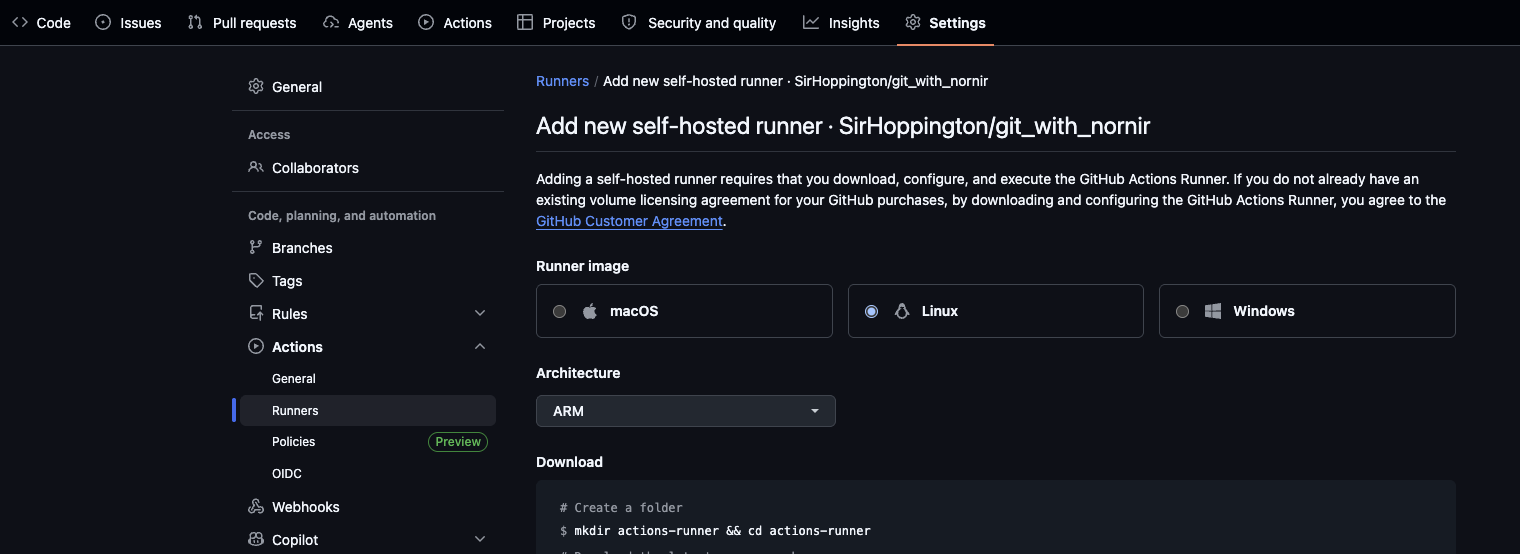
This will show you how to create a runner, however this is assuming you are creating a "long lived" runner, whereas ours will be of a more ephemeral nature - so we'll configure it to run as such.
Note you can either create a Personal Access Token (PAT) or a GitHub Application to authenticate your runner. For a test project like this a PAT is fine, but a GitHub App is better for production where you can reduce the scope and blast radius of the token and the access it grants.
For both approaches you will need to configure a new Dockerfile for the runner and a start.sh script to initialise it. For simplicity and because this is just a personal project, I've used a PAT:
# nornir/Dockerfile

FROM ubuntu:22.04

ARG RUNNER_VERSION="2.336.0"
ARG RUNNER_ARCH="arm64"
# TARGETARCH is auto-provided by buildkit (amd64 / arm64) -> build native for the host.
ARG TARGETARCH

RUN apt-get update -y \
    && DEBIAN_FRONTEND=noninteractive apt-get install -y --no-install-recommends \
        curl ca-certificates jq git sudo \
        python3 \
        python3-pip \
        python3-venv \
    && rm -rf /var/lib/apt/lists/* \
    && useradd -m runner


WORKDIR /home/runner
# Map docker arch -> GitHub runner arch naming (amd64->x64, arm64->arm64).
RUN curl -fsSL -o actions-runner-linux-${RUNNER_ARCH}-${RUNNER_VERSION}.tar.gz -L \
        "https://github.com/actions/runner/releases/download/v${RUNNER_VERSION}/actions-runner-linux-${RUNNER_ARCH}-${RUNNER_VERSION}.tar.gz" \
    && tar xzf actions-runner-linux-${RUNNER_ARCH}-${RUNNER_VERSION}.tar.gz \
    && ./bin/installdependencies.sh \
    && chown -R runner:runner /home/runner

COPY start.sh /home/runner/start.sh
RUN chmod +x /home/runner/start.sh

USER runner
ENTRYPOINT ["./start.sh"]
I've hardcoded
RUNNER_ARCHtoarm64because I'm on an Apple Silicon Mac. If you're on x86 that wants to bex64- GitHub usesx64rather thanamd64in the release filenames, which catches people out.
Then the start script, which swaps our PAT for a short-lived registration token, registers the runner and tidies up after itself:
# nornir/start.sh
#!/bin/bash
set -euo pipefail

: "${OWNER:?set OWNER}"
: "${REPO:?set REPO}"
: "${ACCESS_TOKEN:?set ACCESS_TOKEN}"

REG_TOKEN=$(curl -fsSX POST \
    -H "Authorization: Bearer ${ACCESS_TOKEN}" \
    -H "X-GitHub-Api-Version: 2022-11-28" \
    "https://api.github.com/repos/${OWNER}/${REPO}/actions/runners/registration-token" \
    | jq -r .token)

/home/runner/config.sh --unattended --replace \
    --url "https://github.com/${OWNER}/${REPO}" \
    --token "${REG_TOKEN}" \
    --name "$(hostname)" \
    --labels self-hosted \
    --ephemeral \
    --work _work

cleanup() {
    echo "Removing runner..."
    ./config.sh remove --unattended --token "${REG_TOKEN}" || true
}
trap 'cleanup; exit 130' INT
trap 'cleanup; exit 143' TERM

/home/runner/run.sh & wait $!
The --ephemeral flag means the runner picks up exactly one job and then exits. Combined with restart: unless-stopped in the compose file, the container comes back up and registers a fresh runner.
--labels self-hosted gives us a label we can target from the workflow. self-hosted is applied automatically, but you can add something distinctive if you want to, for example if this runner is for the networks team only we could assign a networks label.
Lastly your .env file should hold the PAT, so make very sure it's in .gitignore before you commit anything. Writing an article about putting everything in Git and then putting your token in Git would be a bad look...even for me.
The network
Provided the runner can route to your network devices, we can now connect via our usual management protocols. In my case I'm running everything on my laptop in Docker and the "production network" is just Containerlab - so the runner reaches it over the Docker network.
For the lab I've created a clab directory with a basic topology file and startup configs in startup-configs. Both the lab and the runner come up from one compose file:
# docker-compose.yml

services:
  clab:
    image: ghcr.io/srl-labs/clab
    container_name: containerlab
    stdin_open: true
    tty: true
    privileged: true
    network_mode: host
    # Set the working directory
    working_dir: "$PWD/clab"
    environment:
      CLAB_NORNIR_PLATFORM_NAME_SCHEMA: "napalm"
    # volumes can be mounted from our host
    volumes:
      - /var/run/docker.sock:/var/run/docker.sock
      - /var/run/netns:/var/run/netns
      - /etc/hosts:/etc/hosts
      - /var/lib/docker/containers:/var/lib/docker/containers
      - ${PWD}/clab:${PWD}/clab:rw
    pid: host
    entrypoint: ./entrypoint.sh
    command: bash

  runner:
    build: nornir
    container_name: nornir-runner
    network_mode: host
    restart: unless-stopped
    env_file: nornir/.env
    volumes:
      - /etc/hosts:/etc/hosts:ro
    depends_on:
      clab:
        condition: service_started
If you're on Docker Desktop for Mac rather than OrbStack or a Linux host,
network_mode: hostmeans the Docker VM rather than your machine, and/var/run/netnswon't exist. You'll have better luck attaching the runner to the Containerlab management network directly.
You'll see the runner has no volume mounts for the scripts. That's because a GitHub Actions job checks out the repository fresh each time into the _work directory, so it executes whatever is in the commit. The repo is the source of truth, not whatever happens to be sat on the runner's filesystem.
Change requests
Here's the model, and it's very simple. Each device gets a folder under change-requests/, and a proposed change is a .cfg file dropped inside it:
nornir/change-requests/
├── r1-lab
│   └── customer-port-3.cfg
└── r2-lab
The folder tells us which device the change belongs to, which means the filename is free to describe the change itself. Nice side effect: two engineers can both have a pending change for r1-lab in separate pull requests without treading on each other.
# nornir/change-requests/r1-lab/customer-port-3.cfg

interface Ethernet3
   description customer-port-3
   no switchport
   ip address 192.168.2.1/24
!
router bgp 65001
   neighbor 10.100.0.2 remote-as 65002
   neighbor 10.100.0.2 description to-r2-lab
   neighbor 10.100.0.2 send-community
   !
   address-family ipv4
      neighbor 10.100.0.2 activate
      network 10.100.0.1/32
!
As we're using the NAPALM plugin with the replace parameter set to False, we're merging into the running configuration rather than doing a full replace - so you only need the lines you care about.
The important part, and the thing that keeps the whole pipeline simple: once a change has been deployed the file is deleted. This is simply to stop the folder getting overwhelmed, while it might feel like throwing away history, you aren't. What was proposed, who approved it, what the device said it would do and when it went out all live in the pull request and in Git history. That's a far better audit trail than a directory of old config snippets, and nobody has to maintain it!
Updating the configuration script
In the previous post configure_devices.py filtered the inventory on a group and deployed to everything in it. Now we want it driven by whatever is pending, which turns out to be less code rather than more - the script just reads the directory:
# nornir/configure_devices.py

import argparse
from pathlib import Path

from nornir import InitNornir
from nornir.core.exceptions import NornirExecutionError
from nornir_napalm.plugins.tasks import napalm_configure
from nornir_utils.plugins.functions import print_result

CHANGE_DIR = Path("change-requests")
REPORT_FILE = Path("diff.md")


def parse_args():
    parser = argparse.ArgumentParser(description="Deploy network change requests")
    parser.add_argument(
        "--dry_run", dest="dry", action="store_true", help="Will not run on devices"
    )
    parser.add_argument(
        "--no_dry_run", dest="dry", action="store_false", help="Will run on devices"
    )
    parser.set_defaults(dry=True)
    return parser.parse_args()


def find_changes():
    """Return {device: combined config} for every device with a pending change.

    A device with more than one pending change gets them joined together, so it
    only takes a single config session on the box.
    """
    changes = {}
    for folder in sorted(CHANGE_DIR.iterdir()):
        configs = [p.read_text().strip() for p in sorted(folder.glob("*.cfg"))]
        if configs:
            changes[folder.name] = "\n".join(configs)

    return changes


def deploy_network(task, changes, dry_run):
    """Configures network with NAPALM"""
    device = task.host.name
    print(f"Deploying to device: {device}")
    task.run(
        name=f"Configuring {device}!",
        task=napalm_configure,
        configuration=changes[device],
        dry_run=dry_run,
        replace=False,
    )


def write_report(result, dry_run):
    """Write the device generated diffs out as markdown for the PR comment."""
    heading = "Dry run - no changes applied" if dry_run else "Changes applied"
    report = [f"### {heading}\n"]

    for device, multi_result in result.items():
        if multi_result.failed:
            body = f"```\nFAILED: {multi_result[-1].exception}\n```"
        elif multi_result[1].diff:
            body = f"```diff\n{multi_result[1].diff}\n```"
        else:
            body = "_No changes - the device already matches this config_"

        report.append(f"**{device}**\n\n{body}\n")

    REPORT_FILE.write_text("\n".join(report))


def main():
    args = parse_args()

    changes = find_changes()
    if not changes:
        print("No change requests pending, nothing to do")
        REPORT_FILE.write_text("### No change requests to deploy\n")
        return

    nr = InitNornir(config_file="config.yml")

    # Nornir happily filters down to nothing and reports success, so check the
    # folder names against the inventory before we go anywhere near a device.
    unknown = sorted(set(changes) - set(nr.inventory.hosts))
    if unknown:
        raise SystemExit(f"Change requests for devices not in inventory: {unknown}")

    devices = nr.filter(filter_func=lambda host: host.name in changes)

    print(f"{'Dry running' if args.dry else 'Deploying'} against: {', '.join(changes)}")

    result = devices.run(task=deploy_network, changes=changes, dry_run=args.dry)
    print_result(result)
    write_report(result, args.dry)

    if result.failed:
        raise NornirExecutionError(result)


if __name__ == "__main__":
    main()
A few things in there are worth a second look, mostly because each one is a mistake I've already made so you don't have to:
The unknown check. If someone fat-fingers a folder name, nr.filter() happily returns an empty inventory, the run succeeds against zero devices and the pipeline goes green. Nornir won't raise on that - AggregatedResult.failed on an empty result is False, because "did any host fail" is False when there are no hosts. A change process that silently does nothing while reporting success is worse than no change process at all, so we check the folder names against the inventory and bail out ourselves.
configuration rather than filename. Because a device can have several pending changes, we join them and hand NAPALM the text directly. That way it's one config session per device and one diff, rather than several.
multi_result[1].diff is where the diff lives. Remember the MultiResult from the last post - index 0 is our deploy_network wrapper, index 1 is the napalm_configure subtask that did the actual work. That's the one holding the device's diff.
Lastly in our main function we filter our nornir object using filter_func this lets us pass another function to complete the filtering, in our exampel we add the function directly via a Lambda but if it was more complex you can pull it out as a function and call it via filter_func.
The dry-run workflow
When a pull request is opened we want to dry run whatever is pending and get the result in front of the reviewers.
# .github/workflows/dry-run.yml

name: Dry Run changes

on:
  pull_request:
    types: [opened, synchronize, reopened]

permissions:
  contents: read
  pull-requests: write

# One dry run at a time, so two PRs can't hit the devices together.
concurrency:
  group: network-dry-run
  cancel-in-progress: false

jobs:
  dry-run:
    runs-on: [self-hosted]
    name: Dry run change requests

    steps:
      - name: Checkout branch
        uses: actions/checkout@v4

      - name: Any pending change requests?
        uses: dorny/paths-filter@v3
        id: filter
        with:
          filters: |
            crqs:
              - 'nornir/change-requests/**'

      - name: Install requirements
        run: python3 -m pip install -r nornir/requirements.txt

      - name: Dry run against the network
        if: steps.filter.outputs.crqs == 'true'
        working-directory: nornir
        run: python3 configure_devices.py --dry_run

      # always() so a failed dry run still reports back to the PR
      - name: Add diff to the job summary
        if: always() && steps.filter.outputs.crqs == 'true'
        run: |
          if [ -f nornir/diff.md ]; then
            cat nornir/diff.md >> "$GITHUB_STEP_SUMMARY"
          else
            echo "### Dry run failed before reaching the devices" >> "$GITHUB_STEP_SUMMARY"
          fi

      - name: Post diff to the PR
        if: always() && steps.filter.outputs.crqs == 'true'
        env:
          GH_TOKEN: ${{ secrets.GITHUB_TOKEN }}
          PR_NUMBER: ${{ github.event.pull_request.number }}
        run: |
          BODY_FILE=nornir/diff.md

          if [ ! -f "$BODY_FILE" ]; then
            printf '### Dry run failed before reaching the devices\n\nCheck the workflow logs.\n' > "$BODY_FILE"
          fi

          # -R reads the file as raw text, -s slurps it into a single string,
          # which gives us a properly escaped JSON payload for free.
          jq -Rs '{body: .}' < "$BODY_FILE" > payload.json

          curl -fsS -X POST \
            -H "Authorization: Bearer ${GH_TOKEN}" \
            -H "Accept: application/vnd.github+json" \
            -H "X-GitHub-Api-Version: 2022-11-28" \
            "https://api.github.com/repos/${GITHUB_REPOSITORY}/issues/${PR_NUMBER}/comments" \
            -d @payload.json
dorny/paths-filter is a community action that works out whether this pull request touched anything under change-requests/. That's all we need it for - the script reads the folders itself, so there's no file list to pass around and no device names hardcoded in YAML. Add a new router, add a folder, and the pipeline carries on without anyone editing a workflow.

A couple of things that caught me out:
- The comment endpoint is
/issues/{number}/comments, not/pulls/.... As far as that API is concerned a pull request is an issue - the/pullscomment endpoints are for review comments anchored to a specific line of code. curl -fsSmatters more than it looks. Without-f, curl happily exits0on a 403 and your step goes green having posted absolutely nothing.
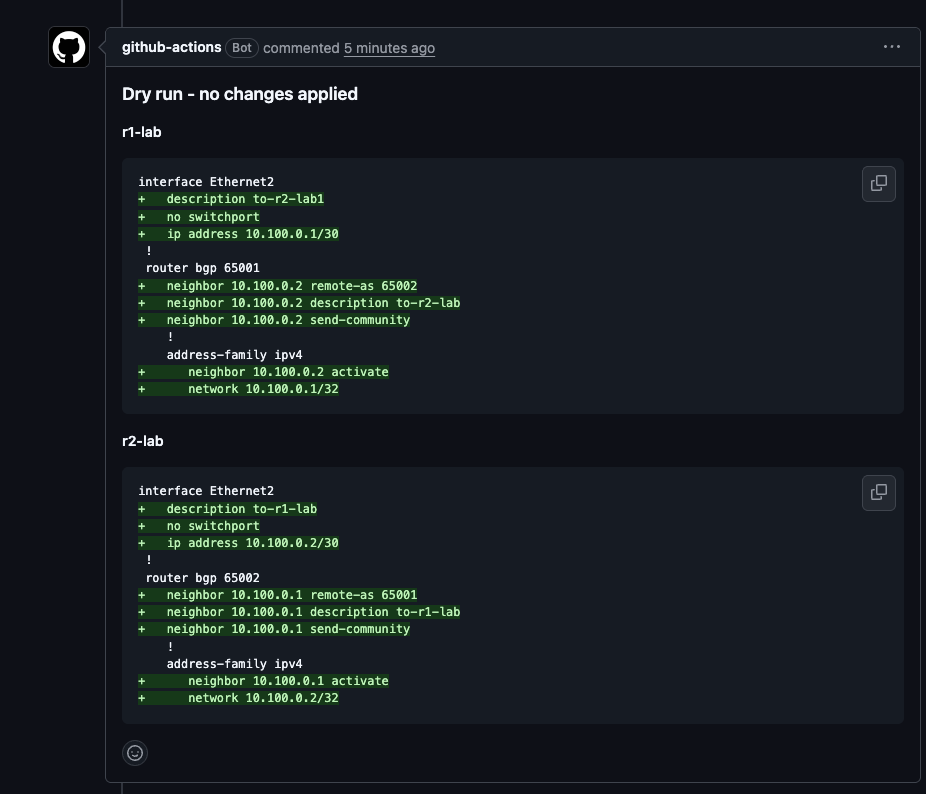
And the payoff is the diff the device itself generated, left as a comment on the pull request. Nothing has been applied, but it's completely clear to any reviewer what is about to change:
Every push to the branch adds a new comment, so a PR that goes through a few rounds of review ends up with a stack of them. If that annoys you, marocchino/sticky-pull-request-comment updates a single comment in place instead.
Making the review mean something
Right now all of this is decorative - nothing stops someone pushing straight to main and skipping the whole lot. Three settings fix that, and they're the ones that actually replace our theoretical change control process.
A CODEOWNERS file requests the right reviewers automatically, based on which device the change touches. Because each device has its own folder we can point at directories rather than individual files:
# .github/CODEOWNERS

/nornir/change-requests/r1-lab/   @SirHoppington @site-a-lead
/nornir/change-requests/r2-lab/   @SirHoppington @site-b-lead
Now the PR requires reviews from those specific users or groups - perfect if certain teams have responsibility for specific devices. The stakeholders who need to see the change are pulled in by the pipeline, and they review it when they've got a minute rather than when a meeting invite says so.
Branch protection on main is next: require the dry run check to pass, require at least one approval, and block direct pushes. Without this, everything above is a suggestion that can be ignored.
The last one is concurrency, which you'll have spotted in the workflow. Two engineers merging at the same time would otherwise have two jobs configuring the same devices simultaneously - queueing them avoids a race you really don't want to debug.
Deploying on merge
Once your designated code owner has reviewed the PR you can go ahead and merge. A second workflow triggers on the merge to main and gets the approved configuration onto the devices:
# .github/workflows/deploy.yml
name: Deploy changes

on:
  push:
    branches: [main]
    paths:
      - 'nornir/change-requests/**'

permissions:
  contents: write        # needed to clear the change requests after deploying

# Queue deploys rather than cancelling them - two PRs merged together must not
# hit the same devices at the same time.
concurrency:
  group: network-deploy
  cancel-in-progress: false

jobs:
  deploy:
    runs-on: [self-hosted]
    name: Deploy change requests
    # Add required reviewers to this environment in the repo settings and the
    # job waits for someone to approve it - a change window, as a button.
    environment: production

    steps:
      - name: Checkout main
        uses: actions/checkout@v4

      - name: Install requirements
        run: python3 -m pip install -r nornir/requirements.txt

      - name: Deploy to the network
        working-directory: nornir
        run: python3 configure_devices.py --no_dry_run

      - name: Add applied diff to the job summary
        if: always()
        run: |
          if [ -f nornir/diff.md ]; then
            cat nornir/diff.md >> "$GITHUB_STEP_SUMMARY"
          else
            echo "### Deploy failed before reaching the devices" >> "$GITHUB_STEP_SUMMARY"
          fi

      # The changes are on the devices now, so the requests have served their
      # purpose. What was proposed, who approved it and what the device said all
      # live in the pull request - an empty folder means nothing is pending.
      - name: Clear deployed change requests
        if: success()
        run: |
          git config user.name  "github-actions[bot]"
          git config user.email "41898282+github-actions[bot]@users.noreply.github.com"

          git rm -q nornir/change-requests/*/*.cfg
          git commit -q -m "chore: deployed change requests [skip ci]"
          git pull --rebase -q
          git push -q
Time to test the magic! From the PR, select Merge Pull Request and add a clever commit message:
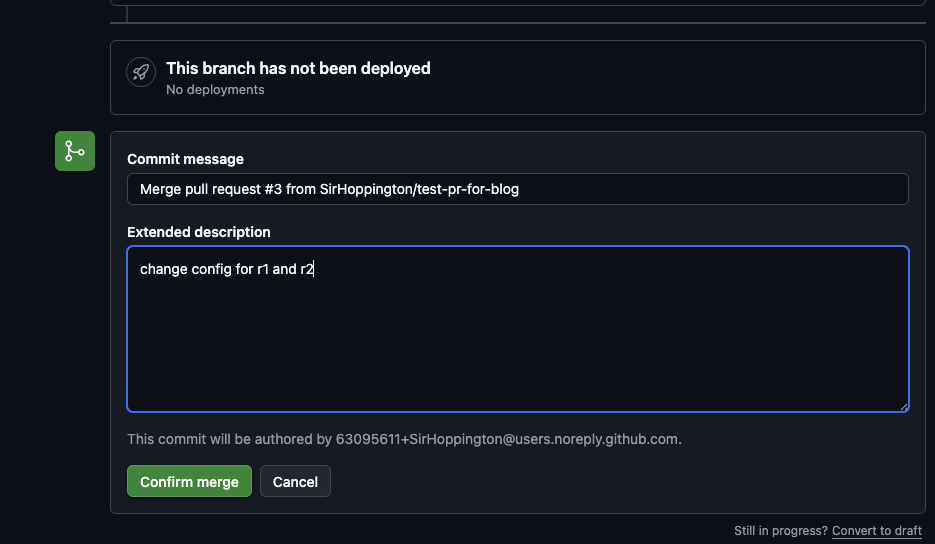
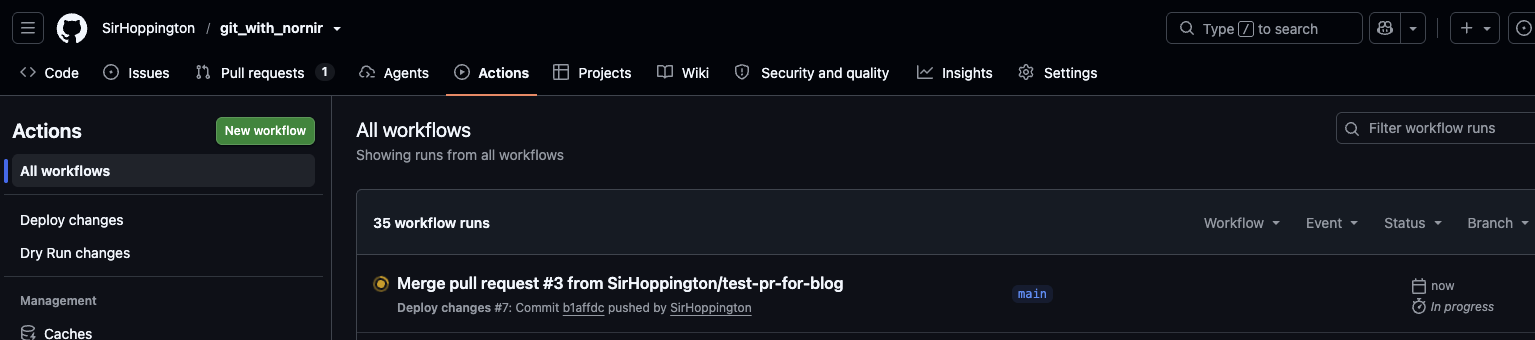
This will run our new Deploy workflow, which you can track by clicking Actions from the GitHub navbar, here you can see our new workflow in progress:
If you view the workflow you should now see the deploy showing the succesfull configuration changes!
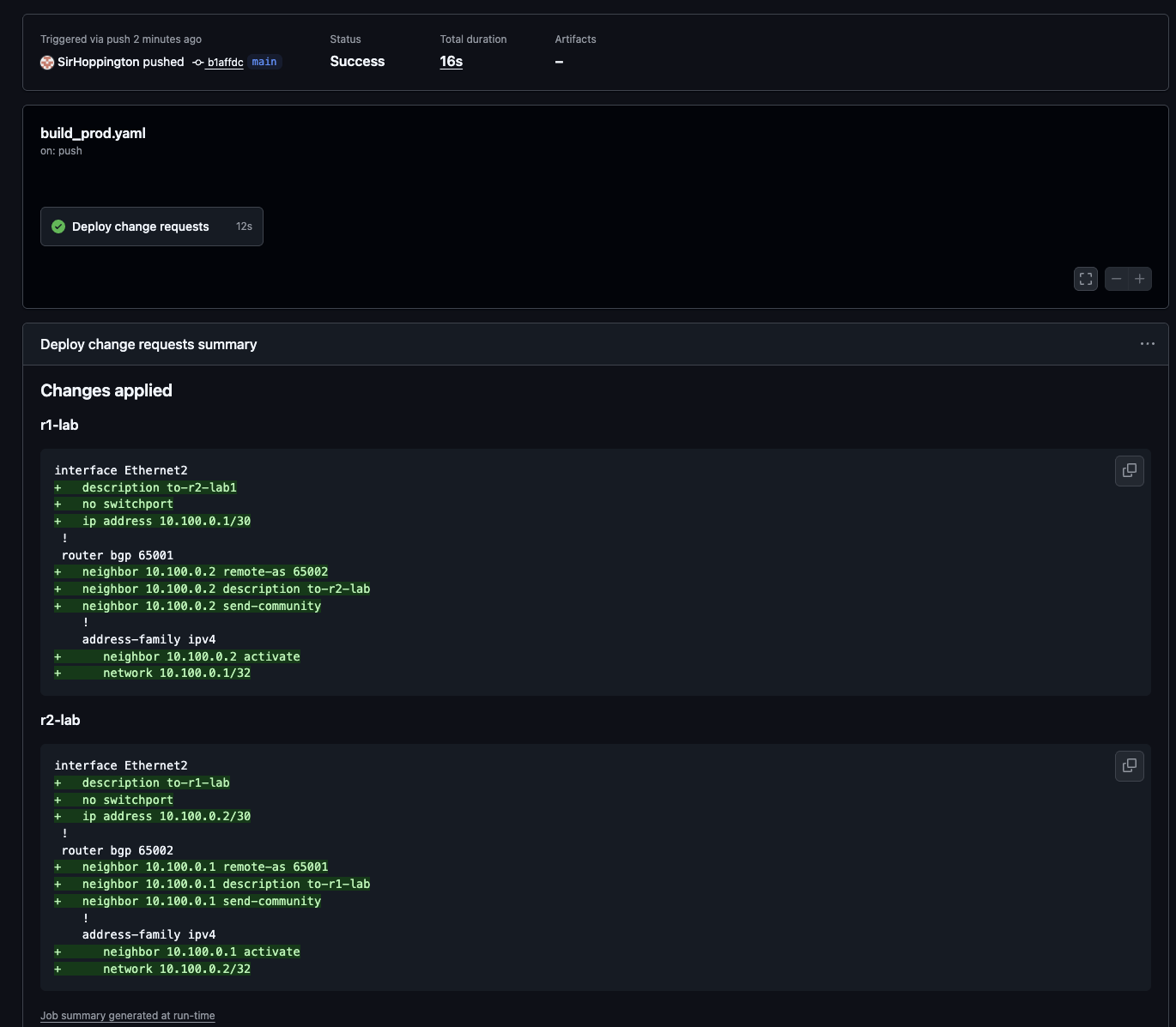
Notice the deploy workflow is shorter than the dry run one. It doesn't need to work out what changed, because the push trigger already guarantees a change request was touched and the script reads the folders itself.
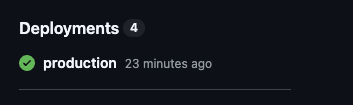
We've also set a GitHub environment with environment: production, this will allow you to view the recent deployments from within our repo, perfect for easily tracking recent deployments.
You could add a manual review gate prior to the deployment, it's entirely optional - plenty of teams will want the merge itself to be the approval - but if you're selling this to a company that currently runs review calls, having a human gate at the end might make the shift easier.
If we login and check the device we can see the configuration has been successfully deployed:
r2-lab#show run | b r b
router bgp 65002
   router-id 10.10.10.2
   no bgp default ipv4-unicast
   neighbor 10.0.0.1 remote-as 65001
   neighbor 10.0.0.1 description to-r1-lab
   neighbor 10.0.0.1 send-community
   neighbor 10.100.0.1 remote-as 65001
   neighbor 10.100.0.1 description to-r1-lab
   neighbor 10.100.0.1 send-community
   !
   address-family ipv4
      neighbor 10.0.0.1 activate
      neighbor 10.100.0.1 activate
      network 10.10.10.2/32
!
end
r2-lab#
The last step is the one that keeps everything tidy: the change requests get deleted and committed back.
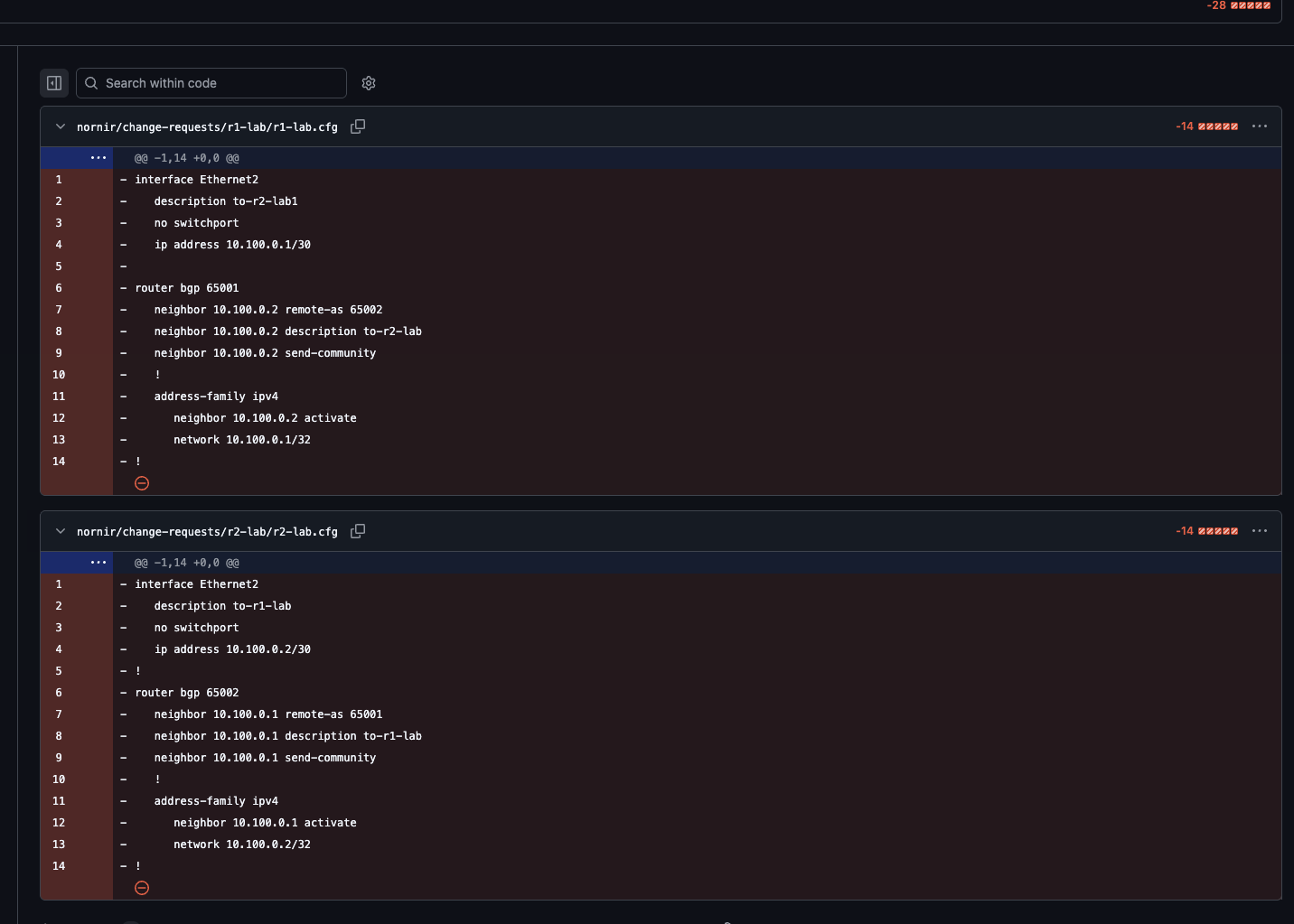
One thing worth knowing: if a deploy fails, the requests stay put. That's deliberate, a failed change shouldn't vanish silently - but it does mean the next merge will pick them up again alongside the new ones.
One thing this doesn't do
Everything above compares your proposed change against the device as it is right now, which is exactly what you want for a review - reviewers see reality, not a stored copy of it that may or may not still be accurate.
What it doesn't do is tell you whether the change is a good one. NAPALM will happily show you a diff for a change that shuts down the wrong interface, and it'll look every bit as tidy as one that doesn't. Somebody still has to read it and know what they're looking at, which is a big improvement on a Word document but a long way short of the network telling you it'll be fine.
That's where I want to take this next, we should validate the configuration changes and that they don't break any existing services!
Fin
So what's changed? A manual change process is gone. The deadline is gone, any review calls are gone. In their place we've got a branch, a diff generated by the device itself, the right reviewers pulled in automatically, and a full audit trail in Git history that nobody had to maintain by hand.
It's not a massive amount of code, most of the value here is in the process, not the code. But it's a step in the right direction!
Next up I want to take the Containerlab side of this a lot further. Right now we're dry running against the real network, which is safe enough but still involves talking to production. The far more interesting version builds a lab from the golden configs in the repo, applies the proposed change there, validates that the network still does what it's supposed to via containerlab, and only then lets you near the real thing.
That's when those config backups from my previous post start being a disposable copy of your network, which we can build and test our config against!
$ comments